When buyers expect to build, price and order custom products online, the tools you choose shape the entire experience. Many teams treat visual configurators and CPQ configurators as interchangeable. Both are types of product configurators, but they solve very different problems. The distinction, visual configurators vs CPQ configurators, affects your user experience, your operational flow, your pricing accuracy and even the performance of your commerce stack.
This matters for every selling model. It matters if you sell to retailers. It also matters if you sell to designers or to consumers. It’s especially important if your brand sells through all three.
Understanding where these tools overlap and where they diverge is the first step to planning a configuration ecosystem that fits your business.
What a Visual Configurator Really Does
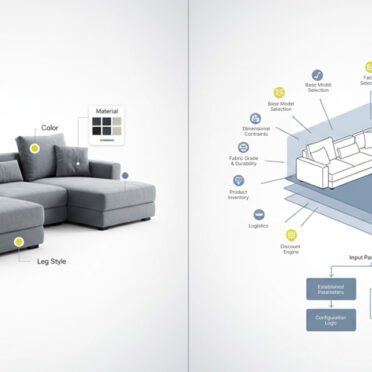
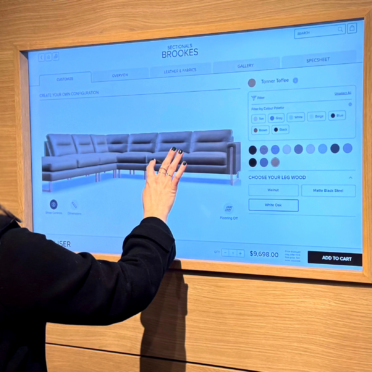
A visual configurator helps buyers understand what they are getting. This is its most important job. The tool presents a real time, interactive visual of the product as the buyer makes choices. For example, it can show material changes, color changes, component changes or dimensional variations. Most systems use 3D models, parametric assets or layered imagery to create an accurate, up to date view.
A strong visual product configurator helps reduce uncertainty. For that reason, 3D visual configurators can reduce return rates by up to 40 percent.
Visual configurators rely on clean product assets and organized data.Visual configurators work best when CAD files, material libraries, product attributes, and variant structures are consistent. In most cases, these tools connect to a PIM or CMS. While they can pass selections into a cart or order record, they are not typically built to handle complex pricing models, quote logic, or compatibility rules without additional custom development.
In fact, most visual configurators aren’t engineered for this level of structured decision-making at all—though some advanced platforms, including Jola’s, are designed to support both the visual experience and the underlying logic required for accurate quoting and configuration.
For categories like furniture, appliances, building products, footwear, sporting goods and custom accessories, visual clarity is part of the buying process. Buyers want to see what they are creating, no matter who they are. A retailer placing a wholesale order wants to validate finish options. A designer wants to check scale or color. A consumer wants confidence before buying a made to order item.
When product appearance influences a purchase, a visual configurator becomes essential. By contrast, a CPQ configurator focuses on logic rather than presentation.
What a CPQ Configurator Really Does
A CPQ configurator handles logic. This is where it is very different from a visual tool. CPQ stands for Configure, Price, Quote. It validates choices, applies compatibility rules, calculates pricing and creates quotes or proposals. It connects deeply with systems like ERP, CRM or OMS to stay aligned with inventory, costs, contract pricing and lead times.
A CPQ configurator uses a rules engine to prevent invalid combinations. It also uses pricing tables, customer group rules or attribute-based logic to generate accurate totals. Many CPQ platforms support approval workflows or multi-level quotations. Some support BOM generation or variant creation inside your ERP.
The rise of CPQ reflects how buyer behavior has changed. Today, 83 percent of B2B buyers prefer to self-serve online, even for configurable products.
This shift means that CPQ logic can no longer live only inside the sales team. Buyers now expect consistent pricing across digital channels. They expect accurate quoting without waiting on manual back and forth. They expect clean handoffs between sales, operations and production.
For B2B brands selling to retailers, CPQ logic helps manage volume pricing, contract pricing, and channel-specific product rules. Meanwhile, for brands selling to designers or consumers, CPQ logic prevents errors and protects margin. In hybrid selling models, CPQ becomes the backbone of product accuracy.
When configuration affects price, cost or production, CPQ becomes unavoidable.
Where Visual and CPQ Tools Overlap
There is real overlap between visual configurators and CPQ configurators. These points matter because they often lead teams to assume one tool can do the job of both.
Shared capabilities include:
- Both help buyers make better decisions
- Both reduce configuration errors
- Both depend on structured product data
- Both influence conversion and revenue
- Both can pass data to your cart, order, CRM or ERP
- Both act as core components of a digital commerce experience
This overlap is useful. It brings your sales, eCommerce and product teams closer together. It also creates confusion when planning your tech stack.
This is why the differences matter.
Where Visual Configurators vs CPQ Configurators Diverge
The gap between visual configurators vs CPQ configurators is not small. It affects your budget, your integration work and your buyer experience.
Visual Configurators Focus on Presentation
- Real time rendering or interactive visualization
- Immediate visual feedback from user selections
- Front end oriented architecture
- Works closely with PIM, CMS or asset management tools
- Helps with engagement, clarity and emotional confidence
- Not built for rules-heavy validation or dynamic pricing
CPQ Configurators Focus on Logic
- Rule-based validation for complex products
- Attribute-driven or contract-driven pricing
- Quoting and approvals
- Deep ERP or CRM integration
- Often tied to manufacturing workflows, including BOM creation
- Not built for photorealistic visualization or interactive 3D
These differences shape the buyer experience. They also influence how a prospect feels about your brand. According to recent research, 67 percent of B2B buyers would switch suppliers for a better consumer-like experience.
A visual configurator and a CPQ tool serve different but equally important parts of that experience.
Why the Difference Matters More Than Ever
The pressure on brands is growing. Buyers want accurate information without friction. Retailers want fewer errors in wholesale orders. Designers want clarity during project planning. Consumers want confidence in what they are purchasing. Internal teams want clean workflows and fewer manual fixes. Importantly, this is a hard balance to come by.
When teams misunderstand the difference between visual tools and CPQ tools, they often:
- Choose the wrong system
- Underestimate the integration workload
- Misalign with ERP or CRM requirements
- Create poor user experiences
- Delay launches
- Spend more in the long run
The need for clarity becomes even greater when brands sell across multiple channels. For example, a consumer-facing configurator may need strong visualization but simple rules. A retailer-facing configurator may need strict validation but no visuals. A designer-facing configurator may need both.
Brands that combine visual clarity with CPQ accuracy tend to see the strongest impact. In fact, companies using 3D-enabled CPQ systems have reported two to three times higher conversion rates and a 20 to 30 percent increase in average order value.
Importantly, these results come from balancing both sides of the configuration experience.
When You Need Each One: Visual Configurators vs CPQ Configurators
You need a visual configurator if:
- Visual clarity influences purchase decisions
- Buyers need to see material or component changes
- You sell high-customization or made to order products
- Your PDP experience needs stronger engagement
- You want to reduce uncertainty and returns
You need a CPQ configurator if:
- Pricing depends on attributes or volume
- Your product has compatibility rules or dependencies
- Sales teams manage quotes with approval steps
- Your ERP must stay in sync with configuration data
- You want consistent pricing across channels
Both are important when:
- Your product has visual complexity and pricing complexity
- You need a product configurator that supports both visualization and accurate pricing
- You sell across multiple channels with different workflows
- You support both self-service and sales-assisted journeys
- Your product configurations impact BOM or production steps
- You want a single configuration experience from PDP to quote
Some brands begin with a visual tool and expand to CPQ. Others start with CPQ and add visualization later. Ultimately, the right path depends on the type of buyer you support and the complexity behind your product.
What This Means for Your Configuration Strategy
The difference between a visual configurator vs CPQ configurator has never been more important. Buyers expect clarity, accuracy and control. Your internal teams expect clean workflows. Your systems require consistent data. Treating both tools as the same often leads to rework, delays and higher project costs.
The smartest path is simple. Map the experience you want buyers to have. Map the operational rules that must stay accurate. Then choose the tools that support both. When you start with clarity, your configuration strategy becomes far more effective across every channel you serve.


MOST POPULAR